
Select your USB Audio Microcontroller With Care!
Scary Stories From The Test Bench.

This is an archive piece from around 2013, referencing work going back as far as 2010, the early days of USB audio on portable devices, rather a Wild West situation at the time. It was co-authored with the excellent Leon Tan (bio at the end), who spearheaded the penetration of our then-employer Cypress Semiconductor’s successful play in the MFi (Made For iPod) space.
We needed to prove that our solution was more robust and more accurate than the efforts of our competitors. It’s been lightly edited where ancient links to technical material no longer work. I’ll post images of a paper on the clock recovery scheme that I wrote back in 2011
Here goes…
USB audio is alive and well, and reports of its demise at the hands of wireless transports such as Wi-Fi and Bluetooth are premature. It has recently become an especially important factor in digital audio (and audio+MIDI) accessories for the music industry (mixers, DJ equipment, digital audio interfaces, microphones, etc). More and more, powerful mobile devices are replacing laptops and portable computers. And the need for USB Audio doesn’t stop at professionals or ‘prosumer’ users, as it’s now readily accessible on many mobile OSs such as iOS and Android, and on hobbyist/maker SBCs such as the Raspberry Pi and BeagleBone Black.
It’s a low-cost, low-power approach to the transport of digital audio and, at its best, can deliver a combination of high quality and low latency that the common wireless methods can’t match. But there’s the rub – you need to make sure it’s working at its best!
The key problem that needs to be solved when replaying (or recording) high quality audio through a USB interface is the generation of the necessary converter master clocks to a very high degree of stability and accuracy. Shortcomings in the audio clock recovery process caused by insufficient attention to detail at the design stage can easily result in measurable imperfections and clearly audible nuisance even to the average consumer.
The flexibility of the latest programmable system-on-chip devices, typified by Cypress Semiconductor’s PSoC 3 family, can be exploited to provide cost-effective, robust and accurate audio master clock generation especially suited to low-power portable systems. An overview of an approach based on such a SoC was given in “Designing Modern USB Audio Systems”. For those with a deep interest in frequency synthesis, the hardware clock recovery methodology is described in detail in a paper that accompanied “The Ins and Outs of Audio” AES. [You can read that here soon – Ed.]
Since those papers were written, the USB Audio team at Cypress Semiconductor has, in the interests of research, spent a lot of time tearing down, testing and measuring a wide range of units with USB Audio capability – not only commercial products but also examples of dev kits and reference designs from microcontroller vendors. As a vendor, programs of careful testing and competitive benchmarking are crucial to ensure that the quality of the design meets customers’ needs and audio industry expectations. There are few things worse than getting a customer bug report about a defect that should have been found before releasing a reference design.
These testing sessions uncovered a rogues’ gallery of audio quality issues. The quality and integrity of audio replay was sometimes surprisingly poor. The audio industry has accumulated an immense body of work on determining the quality of reproduction and the audibility of impairments. It appears that this understanding of audio may have passed the current generation of microcontroller suppliers by, resulting in a generally rather poor standard of audio replay.
That may be down to a tendency for pure-play MCU companies to treat Audio as just another data interface format, without a real understanding of what’s important for achieving good audio quality. Most vendors acknowledge, from their App Notes for example, that managing the time-domain integrity of reproduced audio data is critical to audio quality. But acknowledging the problem is one thing; solving it is another. Some of the methods proposed and implemented for generating the audio master clock and managing data synchronization, have no place in a high quality audio product, as measurement clearly reveals. The rest of this article is a tour through that rogues’ gallery, highlighting some of the most egregious problems uncovered, and discussing the issues behind them.
Robustness – or lack of it
A revealing test for USB audio systems, whichever host they are designed for (but especially for the mobile ones), is to loop a playlist containing a selection of very short segments each with a different sample rate. It seems that this isn’t a favourite test for everyone, and you’d be surprised at how often the test fails. That happens not only with some of the projects put together by chip vendors, but even on off-the-shelf commercial audio products.
Such tests can reveal several distinct behaviours. In some cases, the system under test simply fails to start playing one of the tracks, resulting in a stretch of silence where there should be sound. In other cases, some tracks will, seemingly at random, be played back with a degree of audible distortion, ranging from mild crackling through to catastrophic failure of the jump-out-of-your-skin kind.
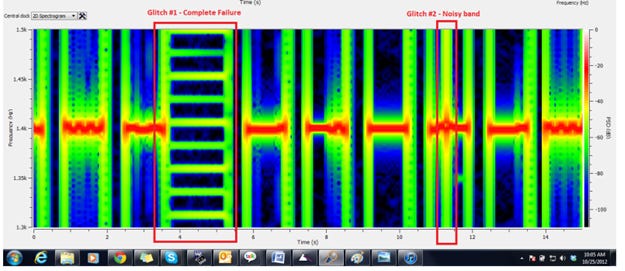
Figure 1: A poor USB audio implementation falling over on sample rate changes.
Figure 1 shows a spectrogram (taken with the very good free program ‘Friture’) of a 1.4 kHz test tone at alternating 44.1 ksps and 48 ksps rates, played through one vendor’s evaluation board. Many things are failing here, the most obvious being a complete, catastrophic failure on one segment. The overall presentation is rather unstable. Figure 2 shows the behaviour of the same test using the reference SoC-based implementation with robust firmware and a solid, hardware-synchronized master clock generator.
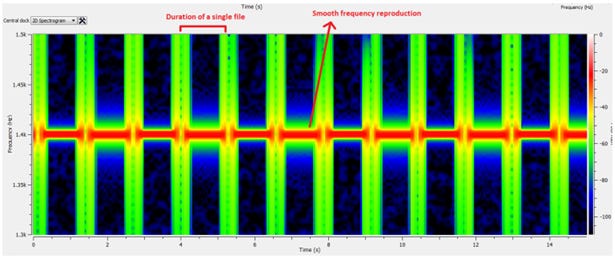
Figure 2: What figure 1 should have looked like (from a SoC system with hardware clock recovery).
One speaker dock, purchased off the shelf in the US, displayed a quite noticeable and annoying pitch shift at the end of any track that was followed by one with a differing sample rate, because it changed the sample rate too early. It’s amusing for about ten seconds, and then the novelty wears off and it’ll be back in the box and off to the store. Even less amused would be the manufacturers having to incur RMA and tech support call costs. Or the mobile device manufacturer having to explain to the consumer that the issue is not with its USB or proprietary connector (versus the good ol’ 3.5 mm jack), but with the accessory.
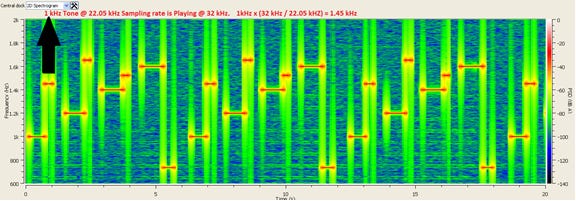
Figure 3: Pitch shifting due to early sample rate changing – extremely audible.
Figure 3 shows the shifting. The pattern should be a step round the frequencies 1 kHz, 1.2 kHz, 1.4 kHz and 1.6 kHz for four different sample rates. The replay frequency from this unit jumps up as soon as the new sample rate becomes known.
Meanwhile, figure 4 doesn’t suffer from this frequency shift problem. Instead, this unit, another openly purchased dock product (from a company with some audio reputation) just gives up randomly on some tracks and doesn’t play them at all.
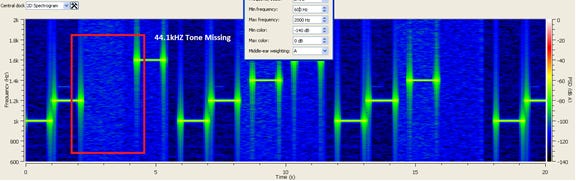
Figure 4: no pitch shift on this one, just completely missing tracks.
So the moral of this particular part of the story is: test your design intensively; find out where it breaks. Do this early on in the process of vendor selection, and then regularly throughout the development process. A modern mobile audio accessory is a spaghetti-fest of code, and innocent changes to an interrupt priority here and a DMA descriptor there can subtly change the behaviour of your system at the margins. Swap your release candidate designs between teams and buy them beer, or tea, or whatever, if (when!) they find the failure points.
Frequency stability – or, you guessed it, the lack of it
If your USB replay device is running in adaptive or synchronous mode, it needs to create the clocks that the digital-to-analog converter will require. For a regular audio DAC, the most likely value for this clock frequency is 256 times the audio sampling frequency. All USB audio interface approaches running in these modes have some sort of adjustable oscillator, and in microcontroller-based systems this oscillator is usually digitally controlled, in firmware. There’s usually a finite, quite coarse resolution to the frequency setting.
It’s quite common for microcontrollers to have some sort of programmable oscillator whose frequency is joggled about to ensure that the mean oscillator rate is set to what you want. You’ll use this to keep track of your FIFO read and write pointers and change the duty cycle of your pointer joggling in a way that holds the gap between them reasonably constant (this is Adaptive mode at work, pushing the CPU hard). This joggling clock is used as the master clock for the DAC, and also to shift data across the interface between the microcontroller and the DAC.
Now imagine that you’re reproducing a nice accurate sinewave. Let’s say that the frequency of that sinewave should be exactly 1.4 kHz (a favourite frequency – 1 kHz is pretty useless when working with USB audio systems) when the DAC is fed samples at exactly 44100 per second (the most standard of the digital audio sampling rates, because it’s the value used on CDs). But what if you’re toggling your master oscillator between two frequencies, such that the system spends half its time replaying at say 44250 samples per second and the other half at 43950 samples per second. For sure, the mean replay rate is 44100 samples per second. But actually, the system spends half of its time sending out a sinewave at 1.40476 kHz and the other half of its time at 1.39524 kHz.
For anyone out there who thinks “hmm, doesn’t seem so bad”, consider this: such a level of pitch shift is considered to be audible to a perfectly average listener – let alone the so-called “golden ears” of the audio industry. And in case you think these are just some ridiculous numbers picked to make a point, look at figure 5, measured off the dev kit of a microcontroller vendor.
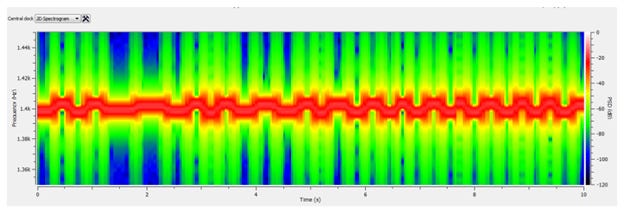
Figure 5: The average frequency is correct, but the variation is audible.
Testing for this kind of thing is so easy that there’s simply no excuse for not doing it. As already mentioned, freeware analysis programs such as Friture usually have a handy spectrogram mode (beloved of speech analysts everywhere, and particularly in Hollywood feature films). This carries out continuous spectral analysis by taking the FFT of successive short blocks, and plots the results over time – time going left-to-right, frequency vertical on your screen and amplitude resolved through a colour mapping.
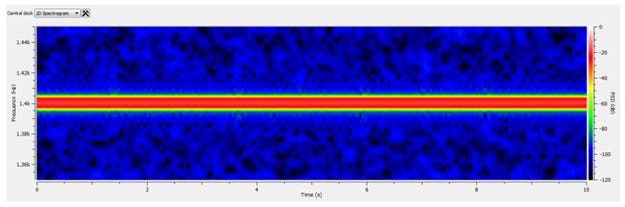
Figure 6: A constant frequency tone should come out this way (again, hardware SoC clock recovery).
It’s super-easy to see replay frequency instability just by feeding your analog audio signal into the line input of a PC running Friture. On a conventional audio analyzer’s regular FFT display, the phenomenon looks rather less pronounced, especially as the tendency is simply to increase the amount of averaging until things stop moving about. And it has very little impact on measured THD+N figures, which only goes to show that a pretty little window with a distortion number in it really doesn’t tell you everything you need to know about the quality of your audio replay system.
This isn’t a universal problem. Systems using good external clock generation chips like the CS2200, chosen by some microcontroller vendors to solve the clocking problem, give a nice clean trace, as does the reference SoC-based system using the hardware clock generation method already mentioned – see figure 6.
This section’s moral? Be skeptical of systems that achieve synchronization by toggling a coarsely-set oscillator between several values. The resultant frequency variation causes a pernicious deterioration in perceived pitch stability, without delivering an apparent degradation in standard audio performance parameters such as THD+N when measured with conventional techniques. It’s no coincidence that some (but not all!) conventional USB MCU application notes and reference designs suggest the use of a BOM-swelling Audio PLL, like the CS2200. It’s a good part, but wouldn’t it be nice if your product design didn’t need such a thing? Embrace the spectrogram and seek the straight line, not the jagged one!
Noise floor spuriae from sample rate conversion
One of the easy-way-out approaches employed in some low-end integrated USB audio devices is to design the system to support only one core sample rate, i.e. either 44.1 ksps or 48 ksps. If the host wants to send audio sampled at the other rate, and is not prepared (or permitted) to do the rate conversion itself, the replay device employs some form of sample rate conversion. And that’s where it all goes horribly wrong. It’s hard enough to design a good sample rate converter when you’ve got a powerful DSP to hand, or as many gates as you want inside an application-specific chip. But regular microcontrollers just can’t cut it. The only things that do get cut are the corners.
One evaluation board tested had acceptable spurious performance when playing back 44.1 ksps material. Fed with 48 ksps test material, the noise floor on the display of the audio analyzer was an enchanted forest of mystery tonal spuriae. The filter response used in the sample rate converter for that mode turned out to have a worst case stopband rejection of only around 55 dB. To cut a long story short, this allowed the resampled aliases of the test tone’s images (unambiguously identified through their frequency) to pop their heads up at a level that was far too high for audio comfort. Figure 7 shows the extent of the problem. This is an audible, broadband issue, and those spuriae don’t lie underneath the ‘masking threshold’ to hide from the ear.
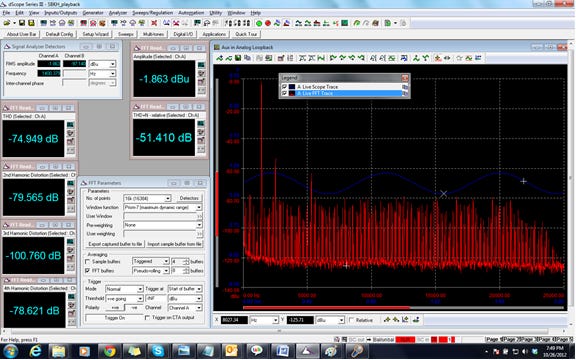
Figure 7: SRC woes: the big fundamental tone should be there, but all the rest should not.
Yet again, there’s a moral: don’t trust sample rate conversion libraries that run on regular microcontrollers. Chances are high that they will be nowhere near good enough for use in a quality audio application. “The best sample rate converter is no sample rate converter at all”, as a technically astute, performance-focused audio manufacturer recently said in reference to this issue.
Crazy converter setups
The replay frequency response of one of the USB Audio evaluation boards didn’t make sense. It looked like someone had grabbed the treble control and turned it all the way down. So it sounded like the speaker had been dropped into a bag of cotton wool.
It turned out that the DAC on the board was being set up to use ‘deemphasis’. That’s a now largely-obsolete option in the CD standard that provides a means to boost high frequencies in the recorded information, and then cut them back, along with any higher frequency hiss, at the replay stage.
Figure 8 is a jumble of traces, but the key one is the yellow one. It should be a ruler-flat horizontal line, and everyone else managed to achieve that except this one vendor.
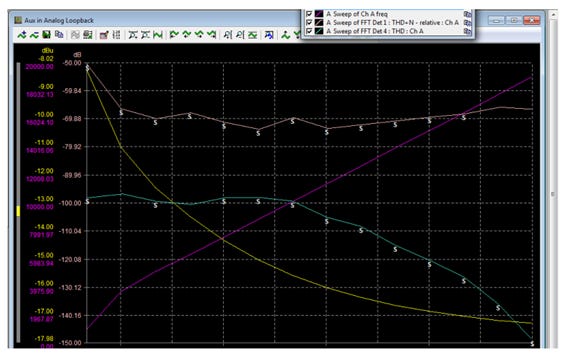
Figure 8: The yellow trace should be flat and horizontal. This one sounded very muffled indeed.
Maybe the people who put the evaluation system together liked a smooth, mellow sound untroubled by hints of treble. Or possibly their lab speakers had an intrinsically peaky high frequency response, and they genuinely thought that this setting must be the right one because it sounded better. The moral – don’t assume that the vendor has set up peripheral components in the right way, especially when they didn’t make them.
Why an USB audio accessory shouldn’t be the host
Some older USB audio accessories are designed to be the host, and force the mobile device to be just that, a device on the USB bus. This might have been acceptable in the old days when the accessory was talking with a slow, dumb music player. These days, it would be nonsensical for a USB speaker dock or DAC to demand that a Mac or PC give up its entire control of the USB bus so that the two of them could swap music data. And it’s just as nonsensical for that accessory to make the same demand of the latest generation of powerful, flexible smartphones and tablet devices.
What about asynchronous USB Audio operation?
Asynchronous USB audio operation is all the rage at the high end. It’s a great idea in principle. You don’t need to do any USB clock recovery or synchronization because you generate the clock yourself. You can make it as clean, stable and accurate as you can afford (and at the high end, people spend a lot of money on clock generators). You keep tabs on the mismatch between your high quality local audio clock and the inherent timing in the host, and get the host to throttle its data rate by occasionally lengthening or shortening a packet.
Not all USB hosts support asynchronous operation. Even when the host can support it, it’s often not the host supplier’s preferred method in a system that needs to handle multiple sinks and sources of audio. It could be responsible for an increase in application processor load in a mobile device, with attendant loss of performance and additional current drain.
The problem is that the host gives up control of the exact replay sample rate to the equipment doing the reproducing. This is a problem when the host is not in control of the sample rate of the source material. An example would be when input audio arrives through an s/pdif input, say from an external device (such as an old DAT player, something Kendall still uses from time to time). The exact source sampling rate is set by the DAT player, but an asynchronously connected replay DAC (in a high quality digital-input speaker, perhaps) wants to be able to set the replay sampling rate.
Another case where things get tricky is when there’s video associated with the audio. Most media players aren’t able to fine-tune the video frame rate in order to stay aligned with an independent sample rate clock defined by external hardware. The discrepancy can be alleviated by the rather unsatisfactory expedient of duplicating or dropping the occasional complete video frame. Now, personally, the priority should be given to the sound over the vision, but it still seems rather brutal.
The poor old USB host (PC, tablet, phone or whatever) is stuck in the middle of all of this, and generally has to try to intercede with some sample rate conversion. Doing a suitably high quality conversion between say 44111sps and 44097sps is processor-intensive, and quite a burden on the host’s operating system. A super-high quality USB audio host might have an internal hardware sample rate converter chip attached to the s/pdif input. But it’s all extra expense, and a potential source of audio degradation if you try to cut corners and use a low-cost SRC.
So asynchronous operation is generally limited to fairly simple audio-only (or video-glitches-not-important) systems where it’s safe for the USB DAC or speakers to set the native rate. Fortunately, the flexibility of modern system-on-chip devices such as PSoC means that you have many clock options with different tradeoffs of cost and jitter, right down to a basic system that will support all sample rates with no crystal required at all.
Conclusions
There are many approaches to creating USB audio replay systems, and many USB microcontroller vendors out there who have implemented such systems. But there’s a surprising variation in robustness and audio performance in these systems.
Look for a vendor team that clearly knows what it’s doing in the audio field, and for a complete, proven reference design that’s clearly been intensively tested (and listened to!). And keep testing, testing, testing throughout your development process. Select a design manufacturing partner that already has some experience with USB Audio. If they only know analog audio, or non-audio applications of microcontrollers, chances are they’ll not appreciate the myriad pitfalls that an under-designed whole system can present.
Pick frequency synchronization schemes with super-fine frequency resolution, in order to get rock-solid pitch stability – you’ll need an external clock synthesizer device like the CS2200 with regular microcontrollers (though not with Cypress Semiconductor’s PSoC 3).
Don’t use low-grade sample rate converter algorithms if you want clean audio – no regular micro can implement long enough filters to suppress spuriae. Don’t rely on asynchronous mode operation to fix everything up if you want a truly general purpose system – though of course it’s a bonus if you can find a platform that can easily support either synchronous or asynchronous operation.
In a nutshell: take care of that USB audio signal! Your customers will thank you for it, one way or another.
Acknowledgements
These heinous crimes against audio quality would not have come to light without many phenomenal hours of lab and ear work by Saksham Bhatla, Gowthamraj B, Krishnaprasad MV and Ahmed Majeed Khan.
Author Bios
[well you know who I am]
Leon Tan serves as a Senior Product Marketing Manager at Cypress Semiconductor, focusing on defining, developing, marketing and selling solutions based around Cypress’s PSoC programmable embedded system-on-chip devices (with the help of his awesome and tireless systems engineering team!). These solutions are targeted at the Consumer Electronics market, specifically MFi (Made for iPod | iPhone | iPad) and mobile accessories, consumer and prosumer audio products, as well as consumer fitness and medical devices.
Most recently, Leon is investigating how Cypress (with PSoC, as well as its market-leading TrueTouch touchscreen and CapSense capacitive touch sensing technologies, and an impending Bluetooth Smart radio) can service the Wearables market, and is looking forward to Wearables being featured on runways and red carpets! Originally from Singapore, and a BSE Computer Engineering graduate from University of Michigan, Ann Arbor, Leon now calls the San Francisco Bay Area his home, and is passionate about delivering innovative technology to consumers in a manner that positively impacts their lives. Ping him at www.linkedin.com/in/leontan or @TheLegacyYears.